Setup freeRADIUS3 on pfsense with external MySQL (or Mariadb)
Ever want to have your Radius sessions, user credentials, user groups etc stored in external MySQL (or Mariadb) database instead of in system level config files? You can easily configure MySQL (or Mariadb) as your data store for all these information for ease of management.
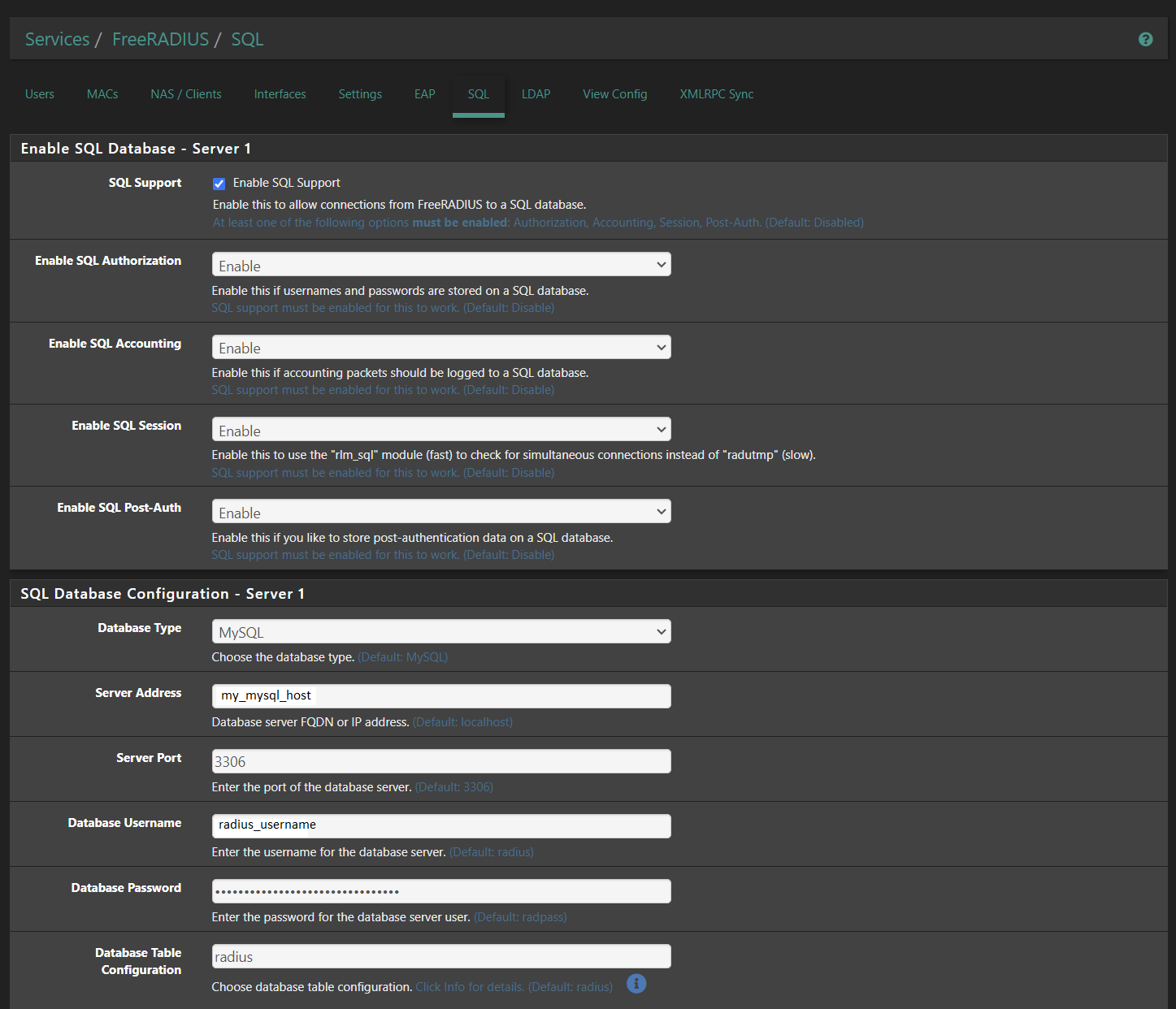
To do so, I have freeRadius3 setup on my pfsense box as a plugin. I only need to:
- Login to your pfsense portal
- Go to
Services->FreeRADIUS - Go to
SQLtab - Check the
Enable SQL Supportcheckbox - I enabled SQL for all 4 types of data to use SQL by checking each checkbox, namely:
Enable SQL AuthorisationEnable SQL AccountingEnable SQL SessionEnable SQL Post-Auth
- Under
SQL Database Configuration - Server 1- Select database type. I use
MySQL. - Specify your database details:
- Server Address: address of your MySQL or MariaDb server
- Server Port: Port used by your database server, I use the default which is
3306 - Database Username: Your database user, e.g.
radius - Database Password: Your user password, e.g.
my_password123 - Database Table Configuration: Your database, e.g.
radius
- I kept the rest of the configurations unchanged
- Restart your FreeRADIUS service by going to Status->Services and click the restart icon next to radiusd
- Select database type. I use

First of all, get your database ready for freeRadius setup:
- I assume that you already have a MySQL or MariaDB setup
- Create a database specifically for freeRadius
create database radius;
whereradiusis your database name - Create a user specifically for freeRadius
create user radius@'%' identified by 'my_password123';
whereradiusis your username ,my_password123is your user’s password - Grant user radius access to your database called radius
grant all privileges on radius.* to radius@'%'; - Create default tables for freeRadius
cd /tmp
wget https://raw.githubusercontent.com/FreeRADIUS/freeradius-server/master/raddb/mods-config/sql/main/mysql/schema.sql
mysql -u radius -p my_password123 radius < schema.sql - Setup some base data for your freeRadius service
- Insert the following data into your database to setup your AP and group
mysql> INSERT INTO nas VALUES (NULL , 'ubiquiti-unifi-ap', 'unifi-ap', 'other', NULL , 'this-is-my-nas-secret', NULL , NULL , 'Unifi AP NAS Client')
mysql> INSERT INTO radusergroup (username, groupname, priority) VALUES ('testuser', 'testgroup', '1');
mysql> INSERT INTO radgroupreply (groupname, attribute, op, value) VALUES ('testgroup', 'Service-Type', ':=', 'Framed-User'), ('testgroup', 'Framed-Protocol', ':=', 'PPP'), ('testgroup', 'Framed-Compression', ':=', 'Van-Jacobsen-TCP-IP');
- Setup your users as follow:
- For clear-text password
INSERT INTO radcheck (username, attribute, op, value) VALUES ('my_user1', 'Cleartext-Password', ':=', 'my_password'); - For NT hashed password
INSERT INTO radcheck (username, attribute, op, value) VALUES ('my_user2', 'NT-Password', ':=', 'my_password_nt_hash');
To get your NT hashed password, you can use the following online utility (use at your own risk)
https://tobtu.com/lmntlm.php - For MD5 hashed password
INSERT INTO radcheck (username, attribute, op, value) VALUES ('my_user3', 'MD5-Password', ':=', 'my_password_md5_hash');
To get your md5 hash, use the following commandsecho -n world | md5sum | awk '{print $1}'
and the output is your md5 hash
- For clear-text password
- Insert the following data into your database to setup your AP and group
- All done, and you can try to login with your newly setup credential
- There are other more complex setup which I will cover in the future sessions
